




Most Zoho CRM content online falls into two camps. Either it is a feature list copied from Zoho's own marketing pages, or it is a generic HubSpot vs Zoho comparison that never shows an actual build. Neither helps a business owner working out whether their own CRM needs a rebuild.
This is not that kind of article. This is the actual architecture of a Zoho CRM implementation we delivered for a wedding platform managing more than 1,200 leads a month across lead generation, sales, operations handover, customer support and post-event follow-up. No theory. The modules, the migration, the timeline and what it actually took.
In short
- The problem was structural, not a HubSpot flaw. A business with four teams working off the same lead at different stages needed multiple custom objects and team-specific views, which got expensive fast on HubSpot's licensing model.
- Zoho was chosen for the ecosystem, not a feature comparison. CRM, invoicing, e-signature, marketing automation and helpdesk on one login, sharing data natively, instead of five separate vendor tools each needing its own integration.
- Five connected products, four modules. Zoho CRM, Books, Sign, Marketing Automation and Desk, plus two custom modules (operations handover, post-event) that do not exist in a standard template.
- The migration moved hundreds of fields, one at a time. No bulk export. Every HubSpot field was checked for active use before it touched the new system, and lead handling never stopped during the switch.
- Four months, kickoff to independent operation. The system now runs 1,200+ leads a month across four teams, with handover happening inside the CRM instead of side conversations and spreadsheets.
The Starting Point
The client was running HubSpot. HubSpot is not a bad CRM, and if your business runs one team through one pipeline it usually holds up fine. The problem here was structural, not a HubSpot flaw. A wedding platform at this lead volume is not one pipeline. It is four teams working off the same lead at different stages, each needing a different view of the same record, and HubSpot's licensing model made adding custom objects and multiple team-specific modules expensive at scale.
The brief was direct. Rebuild the entire CRM in Zoho, replicate every workflow HubSpot was running, migrate the historical data without losing a single field, and get the new system live within a fixed window, without a gap in lead handling at any point during the switch.
Why Zoho Over HubSpot for This Specific Case
This is worth stating plainly because most comparisons avoid it. Zoho was not chosen because it is universally better. It was chosen because this business needed five things inside one ecosystem, on one login, without five separate vendor bills: CRM, invoicing, e-signature, marketing automation and helpdesk. Zoho Books, Zoho Sign, Zoho Marketing Automation and Zoho Desk all sit natively on the same platform as Zoho CRM and share data with it by default. Building the equivalent stack on HubSpot would have meant HubSpot for the CRM, a separate invoicing tool, a separate e-signature tool and a separate helpdesk, each needing its own integration built and maintained. For a business already managing four internal teams, one login surface mattered more than any single feature comparison.
The Module Architecture
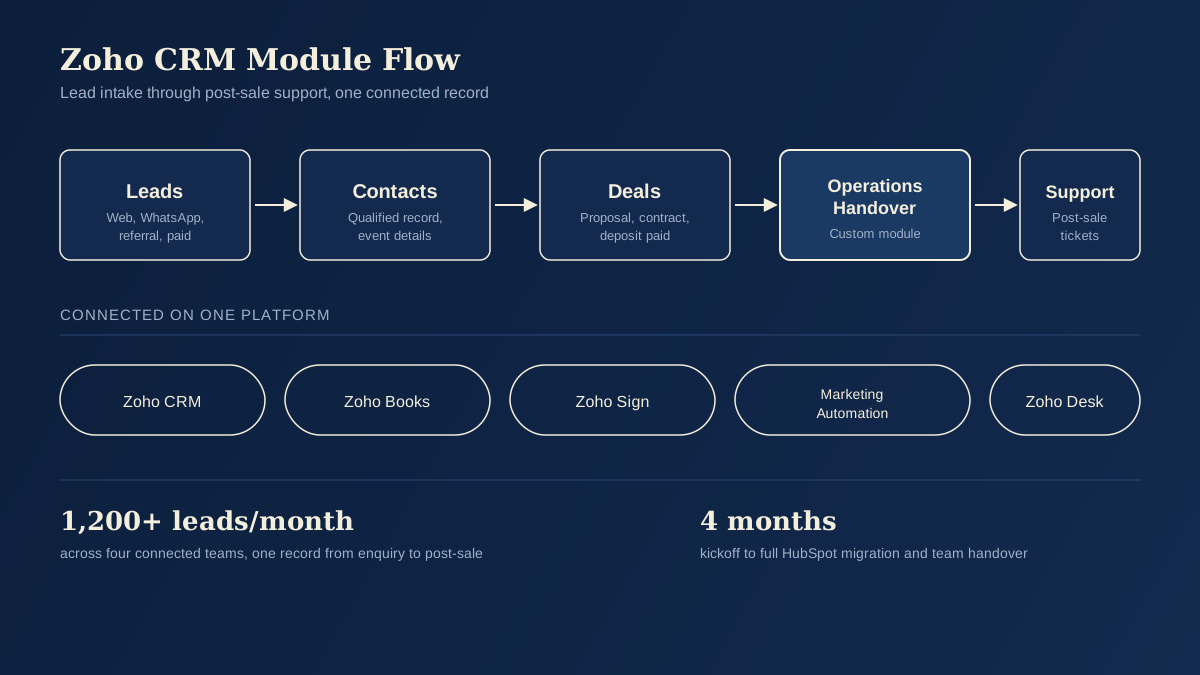
The core of the build is four connected modules, each mapped to a stage the lead actually moves through in the real business, not a generic CRM template stretched to fit.
Leads module. Every enquiry lands here first, tagged by source (website form, WhatsApp, referral, paid campaign) so the marketing team can see channel performance without asking sales for a manual report.
Contacts module. Once a lead is qualified, it converts into a contact record, holding the couple's details, event date, venue preference and budget range, all fields the sales team actually uses in a conversation, not fields that looked useful in a planning meeting and never got touched again.
Deals module. This is where the sales pipeline lives, structured by real stages: enquiry received, proposal sent, contract signed, deposit paid, rather than the default Zoho pipeline stages nobody had customised.
Custom operations handover module. This is the piece that does not exist in a standard CRM template. Once a deal closes, a custom module fires that hands the record to the operations team with everything they need already attached: signed contract, payment status, event date, vendor requirements. Operations never has to go back to sales and ask what was agreed. The handover is the record.
Custom post-event module. After the event, a final custom module tracks post-wedding actions: review requests, referral follow-up, and album or media delivery status, so nothing falls through after the event date passes and the couple stops being an active deal.
This kind of custom module design is exactly why a real estate business with a similarly long, multi-team sales cycle would benefit from the same underlying pattern, even though the field names would differ entirely.
Payments, Contracts and Signatures
Every estimate the sales team sends is generated and signed through Zoho Sign, tied directly to the deal record, so a signed contract is never a PDF sitting in someone's inbox disconnected from the CRM. The moment it is signed, the deal record updates automatically and the operations handover module is triggered.
Payments run through Zoho Books, connected to the same deal record. Deposit received, balance due, and final payment status are all visible against the deal without anyone switching systems or reconciling two separate spreadsheets at month end. For a business processing deposits and staged payments across hundreds of active events at once, this alone removed a meaningful chunk of manual admin that used to sit with a finance person cross-checking bank statements against a CRM that had no financial layer at all.
Marketing and Social Layer
Campaigns run through Zoho Marketing Automation, connected to WhatsApp automation through BotSpace for the conversational side of lead nurture. A new lead entering the CRM can trigger a marketing sequence automatically, and a reply on WhatsApp updates the same lead record rather than existing as a separate, disconnected conversation thread. Social media enquiries feed into the same lead intake point rather than living in a separate inbox that someone has to check manually and copy into the CRM by hand.
Support and Post-Sale Layer
Zoho Desk handles ticket automation for customer support, connected to the same contact and deal records. When a couple raises a support ticket after booking, the support agent sees the full deal history, not just the ticket. No asking the couple to repeat their event date or what was agreed in the original contract. Ticket routing rules are automated based on which stage the deal was in when the ticket was raised, so a pre-event logistics question and a post-event review request never land in the same queue.
The Migration: Hundreds of Fields, Zero Gap in Lead Handling
Migrating from HubSpot involved several hundred custom fields across leads, contacts and deals, built up over years of the client adjusting their process inside HubSpot's structure. This is the part most CRM migration guides skip entirely, and it is the part that actually determines whether a migration succeeds or quietly breaks reporting six months later.
Every field was mapped individually before a single record moved. Not a bulk export and import. Field by field, checking which HubSpot fields were still in active use, which were legacy and safe to retire, and which needed a different data type in Zoho to work with the new custom modules. Duplicate and stale records were cleaned during the mapping stage rather than migrated as-is, which is the single biggest reason CRM migrations end up with worse data quality than what they replaced.
The switch itself was staged so lead handling never stopped. HubSpot kept receiving and routing live enquiries while the Zoho environment was built and tested in parallel, and the cutover happened once the new system had been validated against real data, not assumed to work from a demo environment.
Timeline and Result
The full build, migration and handover to the client's internal teams took four months from kickoff to the client running the system independently. That includes all five connected products, all custom modules, the full field migration, and training the operations, sales and support teams on their specific views inside the new CRM.
The system now manages more than 1,200 leads a month across the four connected teams, with the handover from sales to operations to support happening inside the CRM itself rather than through side conversations, shared spreadsheets or a WhatsApp group someone has to keep track of manually.
What This Means If You Are Considering a Similar Move
A Zoho implementation at this depth is not a weekend project, and it should not be sold to you as one. If your business runs a single, simple sales pipeline, you likely do not need five connected Zoho products and four custom modules. But if you have multiple teams touching the same lead at different stages, a payment and contract layer that currently lives outside your CRM, and support tickets disconnected from sales history, this is what the actual build looks like, not the marketing version of it.
Before you sign anyone for a CRM migration, it is worth understanding what a CRM migration actually costs and what questions separate a proper implementation from one that just moves your data and calls it done.
If you are managing a similar volume of leads across more than one internal team and your current CRM cannot show you the full record from enquiry to post-sale in one view, that is usually the sign a rebuild like this one is worth scoping properly rather than patching around the gaps.
Frequently asked questions
How long does a multi-module Zoho CRM implementation like this take? This build took four months from kickoff to the client's internal teams running the system independently, covering five connected Zoho products, two custom modules, a full field-by-field migration from HubSpot, and training across sales, operations and support. Timeline scales with how many teams and custom modules the business actually needs, not just CRM setup on its own.
Why choose Zoho CRM over HubSpot for a multi-team business? Not because Zoho is universally better. In this case, the business needed CRM, invoicing, e-signature, marketing automation and helpdesk on one login, sharing data by default. Zoho Books, Sign, Marketing Automation and Desk all sit natively on the same platform as Zoho CRM, where the equivalent HubSpot stack would need four separate tools, each with its own integration to build and maintain.
What does a Zoho CRM to HubSpot data migration actually involve? Every custom field gets mapped individually before any record moves, checking which fields are still active, which are legacy, and which need a different data type for the new structure. Duplicate and stale records get cleaned during mapping rather than carried over as-is. The old system keeps running live enquiries while the new one is built and tested in parallel, so lead handling never stops during the cutover.
What are custom modules in Zoho CRM, and when do you need them? Custom modules are Zoho objects built around a stage in your specific process that the default Leads, Contacts and Deals modules do not cover, like an operations handover or a post-sale follow-up stage. You need them when a deal closing is not the end of the process, when another internal team picks up the record afterward and needs everything attached, not a fresh conversation to reconstruct what was agreed.
Is this kind of Zoho CRM build only for wedding or events businesses? No. The pattern, a lead moving through qualification, a sales pipeline, a handover to a second internal team, and a post-sale support layer, applies to any business with a multi-team sales cycle: real estate, professional services, healthcare bookings, or any operation where closing a deal is not the last internal step.
GoDesign builds Zoho and HubSpot CRM implementations for UAE and Pakistan businesses managing multi-team sales cycles, complete with custom modules, connected billing and support layers, and full data migrations that do not break your reporting. Book a discovery call to scope your own CRM implementation.
Want more Zoho CRM case studies like this one, or a scoped plan for your own rollout? See our Zoho implementation service or talk to our CRM team.