





A small online gifting store in the UAE came to us asking for "a very basic CRM". After a discovery call and a read-only look at their Shopify admin, we recommended something else: keep Shopify as the system of record, connect a WhatsApp platform to it, fix how sign-ups are captured, and switch on seven automated messages tied to real store events. We also put a CRM review in the diary for three to six months out. This post walks through how we got there: the problems the owner described, the questions we asked, what we found, the options we weighed and how to decide whether your own store needs a CRM yet.
One caveat before we start. This is a proposal, not a case study. Nothing below has gone live yet, so there are no results to report, only the reasoning. We have left out anything that would identify the business.
What the owner told us
The business sells gifts for occasions: birthdays, anniversaries, Mother's Day, Christmas and, biggest of all, Valentine's Day. It had recently relaunched with new branding, new product photography and a rebuilt Shopify store with subscriptions, a loyalty scheme and a delivery date and time-slot picker. Until earlier in the year it had no website at all. Orders came in on WhatsApp, on staff phones, and the owner described that period as "the dark ages".
Their goal was blunt: double the business. Money had already gone into the rebrand and the site, so the return needed to start now. Here is what was getting in the way:
- They wanted to send an email or a WhatsApp to their customers, nothing fancier, and without spending a fortune on software.
- The sign-up pop-up did not connect to anything. The owner had built a welcome email themselves with Shopify's built-in AI assistant and tested it. But people joining through the pop-up never received it, and they could not work out why.
- Every customer was on WhatsApp, on someone's phone. That history needed to live somewhere the business owned, and moving it felt like a huge job.
- Peak season was close. Christmas was weeks away and Valentine's soon after, with no campaigns ready.
- The web developer's job was done. They had told the owner, fairly, that what they needed next was a Shopify marketing specialist, not more development.
- They were afraid of choosing wrong: if they went with Shopify now, would it be hard to switch to something better in a year?
The owner was also clear about the market. There are luxury players at the top and mass-market sellers at the bottom, and a customer who has one bad experience has five other places to order from. Retention mattered as much as acquisition.
How we diagnosed it
We did not open with a deck. On the call we shared a simple journey map: each stage a customer goes through, the event that should trigger something, what that step should achieve and what we needed to check. Then we asked questions.
| Question we asked | Why it matters |
|---|---|
| How many orders and enquiries come in a day, and who answers them? | Volume decides whether you need a CRM or just better plumbing. Here it was a handful a day, handled by a small team. |
| What happens today after someone messages on WhatsApp or fills in the form? | If the honest answer is "nothing structured", that is where the first automation goes. |
| What is already set up in Shopify? | The welcome email and abandoned-checkout email already existed. You refine what works rather than rebuild it. |
| Which date matters most, and how soon is the next one? | The nearest peak sets the order of the work. |
| What does success look like? | "Double the business" points at repeat customers and campaigns, not just faster replies. |
| Which number do customers message, and is it a business line or a staff phone? | It decides whether the existing number moves to the WhatsApp Business API or a new one starts. |
| Do customers give a different WhatsApp number from their phone number at checkout? | In the UAE they often do. Without a separate field, messages go to the wrong number. |
| What should this cost each month now, and what if volume grows? | The running cost has to make sense at today's size, not the size you hope for. |
After the call we asked for read-only access and reviewed the live store and the Shopify admin without changing anything. We signed up as a customer, put items in the cart, opened the customer record that sign-up created, went through the installed apps and the theme code, and compared what product pages promised with how delivery actually worked.
What the review turned up
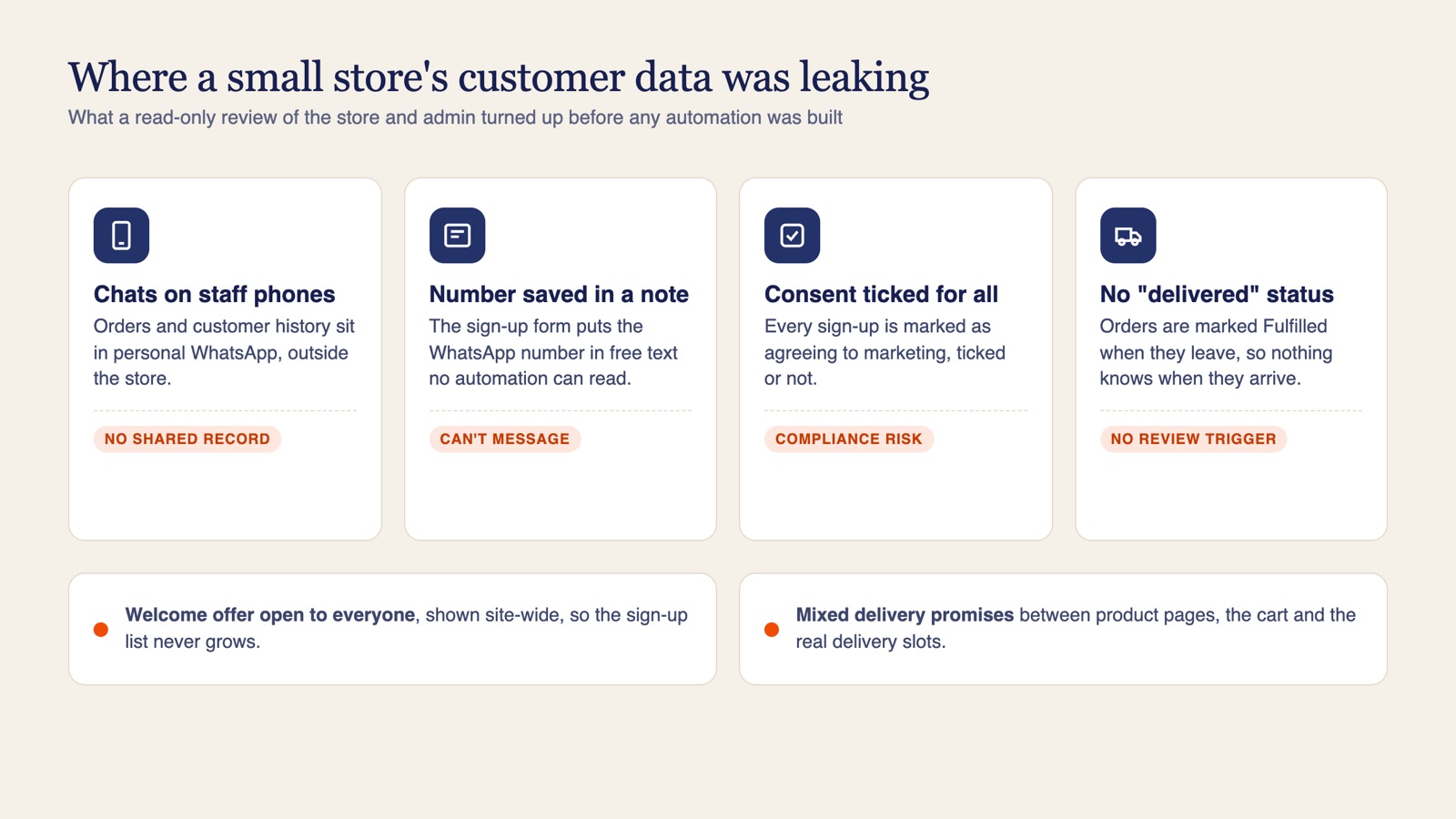
This part took the least time and was probably the most useful. None of these problems were visible from the owner's side of the screen:
- A dead WhatsApp button. The "send us your details on WhatsApp" link on the sign-up page pointed at a placeholder number, so every sign-up from that page went nowhere.
- Phone numbers in the wrong place. The sign-up form saved the customer's WhatsApp number into the free-text note on their record. Neither Shopify's automations nor a WhatsApp platform can use a number stored there.
- Consent recorded for everyone. Every sign-up was marked as agreeing to email marketing, whether the box was ticked or not. That is a compliance risk, and it spoils your list data too.
- A welcome offer that could not grow the list. The discount promised for joining was also shown in the site header and worked for anyone at checkout. Nobody needed to sign up to get it.
- Two WhatsApp widgets. An old chat widget was still installed and would have clashed with the new platform.
- Mixed delivery messages. The cart's free-delivery bar showed a confusing amount and a different threshold from the one on product pages. Product pages promised very fast delivery, while the delivery app only offered next-day slots in fixed windows.
- Duplicate and leftover apps. Two delivery apps were installed at once, one flagged with a warning by Shopify, and code from a removed reviews app was still in the theme.
- No "delivered" status. Orders were marked Fulfilled when they left the shop. Nothing recorded when they arrived, so a delivery update or a review request had nothing to trigger it.
We split the list. The sign-up, consent and WhatsApp items belonged in our project. The cart, theme and delivery-promise items went to the web developer, with a note on where to find each one.
The welcome-email mystery that started all this came down to items 2 and 3: the pop-up was creating customers, just not with the data or the consent flags the automations needed.
The options we weighed
| Option | Good at | Weak at | Fit for this store now |
|---|---|---|---|
| Shopify alone (Shopify email, Shopify Flow) | Email campaigns, abandoned checkout, order confirmations | WhatsApp, qualifying enquiries, complaints; delivery updates only partly | Not enough on its own, because customers live on WhatsApp |
| Shopify plus a WhatsApp platform | WhatsApp automation, a shared team inbox, broadcasts to opted-in segments, all triggered by Shopify events | Deep cross-channel analytics and lead scoring | Recommended |
| A full marketing CRM now (Klaviyo or similar) | Advanced email, SMS and WhatsApp journeys, analytics, ad integrations | Priced on active profiles, a bigger setup, and a second setup plus migration if the choice turns out wrong | Too early |
| Custom code on Shopify | Anything, in theory | Hard for a small team to maintain | No |
The CRM option deserved a fair hearing, and it got one. A platform like Klaviyo does email and WhatsApp automation well and is easier to manage at scale than stitching tools together. But it charges by active profiles, and its free tier stops at 250, which a store collecting sign-ups would outgrow within a month or so. The larger cost is the setup project, then possibly paying again to move later.
Migration was the owner's real worry, so we were straight about it: moving CRMs is slow. Lists, deals, how leads are handled and the links to Google and Meta ads all have to be rebuilt the new platform's way, and you have to make sure thousands of imported customers do not suddenly get a welcome email. We have seen a move between two large CRMs with tens of thousands of contacts take the best part of a year (we wrote up a smaller HubSpot to Zoho migration separately).
There is a second argument for waiting, and we think it is the stronger one. Choose a CRM before your processes have settled and you end up with a system built around processes you no longer run. A few months of real data on what customers ask for, which segments buy and which messages work makes the CRM decision much easier.
The owner got there before we did: "I think it's the right way to do it, but we're just not there yet." With a small team, the money was better spent on getting the basics right.
What we proposed and why
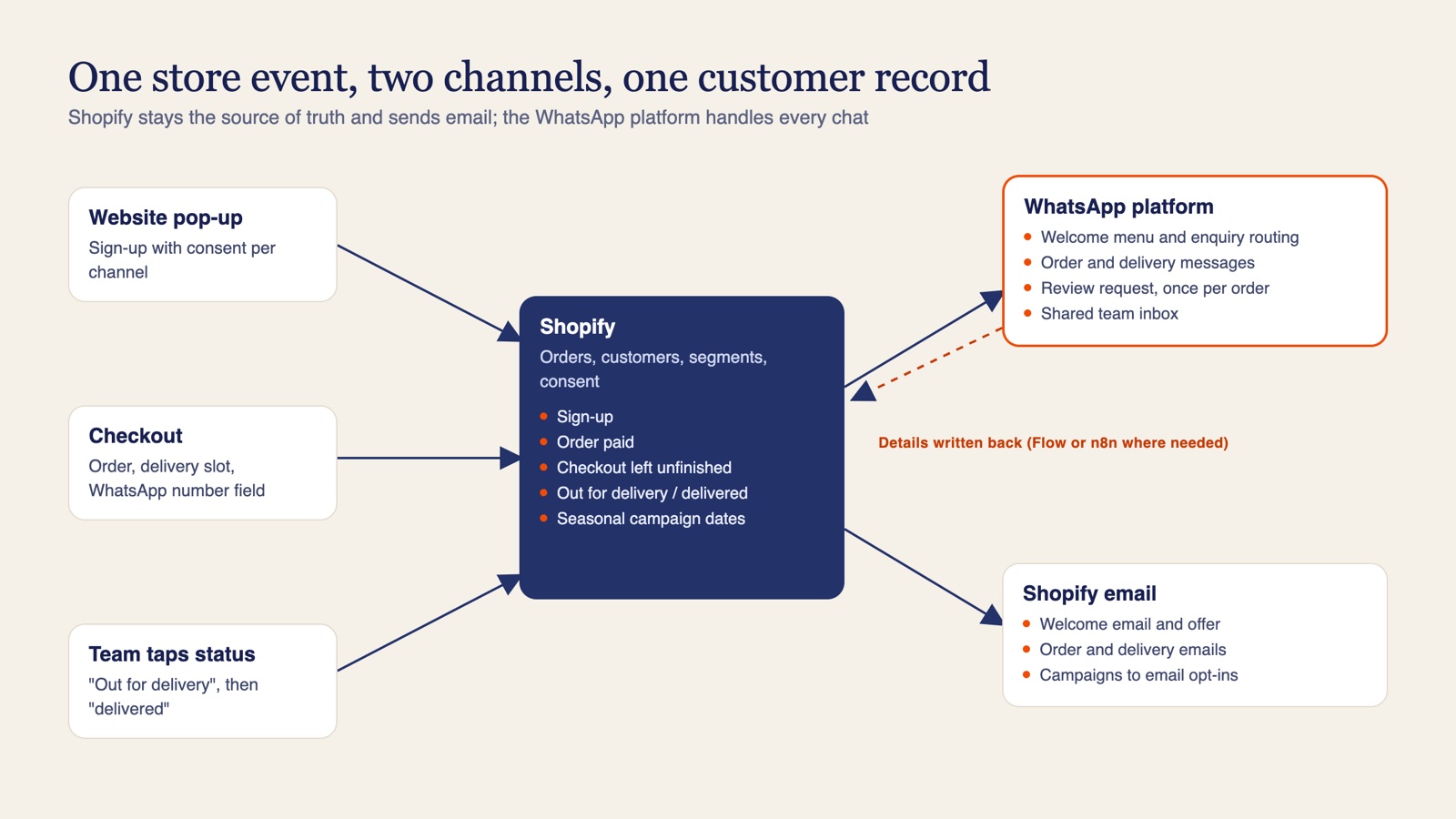
The setup is simple to describe. Shopify stays the source of truth for orders, customers and subscriptions, and sends every email. The WhatsApp platform handles everything on WhatsApp, including a shared inbox that replaces staff phones. When something happens in Shopify (a sign-up, an order, a delivery) it triggers a WhatsApp message and, where it makes sense, an email. Where the WhatsApp platform cannot write a detail back to the Shopify customer record, a small Shopify Flow or n8n step fills the gap. We use BotSpace for the WhatsApp side; its Pro plan starts at about $15 a month and Meta's message fees pass through without a markup.
Seven flows, each with a safeguard:
| Flow | What triggers it | What the customer gets | Safeguard |
|---|---|---|---|
| 1. Welcome | Pop-up sign-up or a first WhatsApp message | Welcome message with a menu: new order, existing order, bespoke request; refined welcome email | Marketing only if the consent box was ticked |
| 2. Enquiry routing | A menu choice or the website form | Questions on occasion, date, budget, delivery area and recipient, then a hand-off to the team | Bespoke, urgent and complaint chats go straight to a person |
| 3. Checkout reminder | Unfinished checkout | WhatsApp reminder with a link back, next to the existing email | Stops the moment the order is placed |
| 4. Order confirmation | Order paid | Delivery date and slot, or pickup details | Goes to the buyer only, never the gift recipient |
| 5. Delivery updates | Team taps "out for delivery", then "delivered" | Two short updates; pickup orders get a ready-for-pickup message | Fires only on the status the team records |
| 6. Review request | Order delivered or picked up | A thank-you with the Google review link | Once per order, skipped if a complaint is open |
| 7. Seasonal campaigns | Christmas and Valentine's first, then other dates | Offers on WhatsApp and email | Only on the channels each customer opted into |
A few details matter more than they look.
Fields, not notes. Each new contact gives a short set of details as real fields: name, WhatsApp number if different from their phone, occasion and date, recipient, budget band, delivery area and consent per channel. A WhatsApp number field goes on the checkout too. A note field holds text. Fields are what automations, segments and any future CRM can use.
The buyer and the recipient are different people. Gifting stores hold two sets of contact details on every order. Order and delivery messages go to the person who paid. Spoiling a surprise by messaging the recipient is a mistake you only make once.
A "delivered" tap is one of the most useful buttons in the shop. Delivery updates and review requests both depend on it. It costs the team one tap per order, and every review request hangs off it.
Segments are made for campaigns. Repeat buyers, high basket value, one-time buyers and occasion interest, set up in Shopify, so the Christmas message to a loyal customer is not the same as the one to someone who bought once in spring. The Christmas and Valentine's campaigns are handed over as templates the team can copy for every date after.
The nearest peak goes first. The plan runs over three weeks. Week one fixes sign-up and consent, sends the Christmas email campaign and starts Meta business verification on day one, because verification and template approval usually set the pace for WhatsApp. Week two puts WhatsApp live, imports the contacts from staff phones once (tagged by whether each person agreed to marketing) and switches on the menu and order messages. Week three adds delivery updates, review requests, segments and Valentine's templates, then training. If Meta approval runs late, the campaign goes by email first and on WhatsApp once templates clear.
Some things were deliberately left for later and quoted separately: reminders before customers' saved birthdays and anniversaries, AI answers to common questions, complaint tracking and handling subscription changes in chat. Each one is worth doing once volume justifies it, and none of them is needed to win the next peak.
On money, two principles. The setup is a one-time fee with no retainer. Software and Meta fees are billed to the business directly, with no markup from us, so the accounts and the customer data stay in the business's name. At UAE rates, one marketing message to 1,000 opted-in customers costs about AED 183 in Meta fees, and order and delivery updates cost less per message. Our WhatsApp Business API pricing guide has the full breakdown.
There was one more reason for this recommendation, and it covers the owner's fear of switching later. Clean fields, consent recorded per channel, consistent tags and accounts in your own name are exactly what make a future CRM migration an import rather than a clean-up project. So the work done now also prepares for the CRM.
Do you need a CRM yet? A practical check
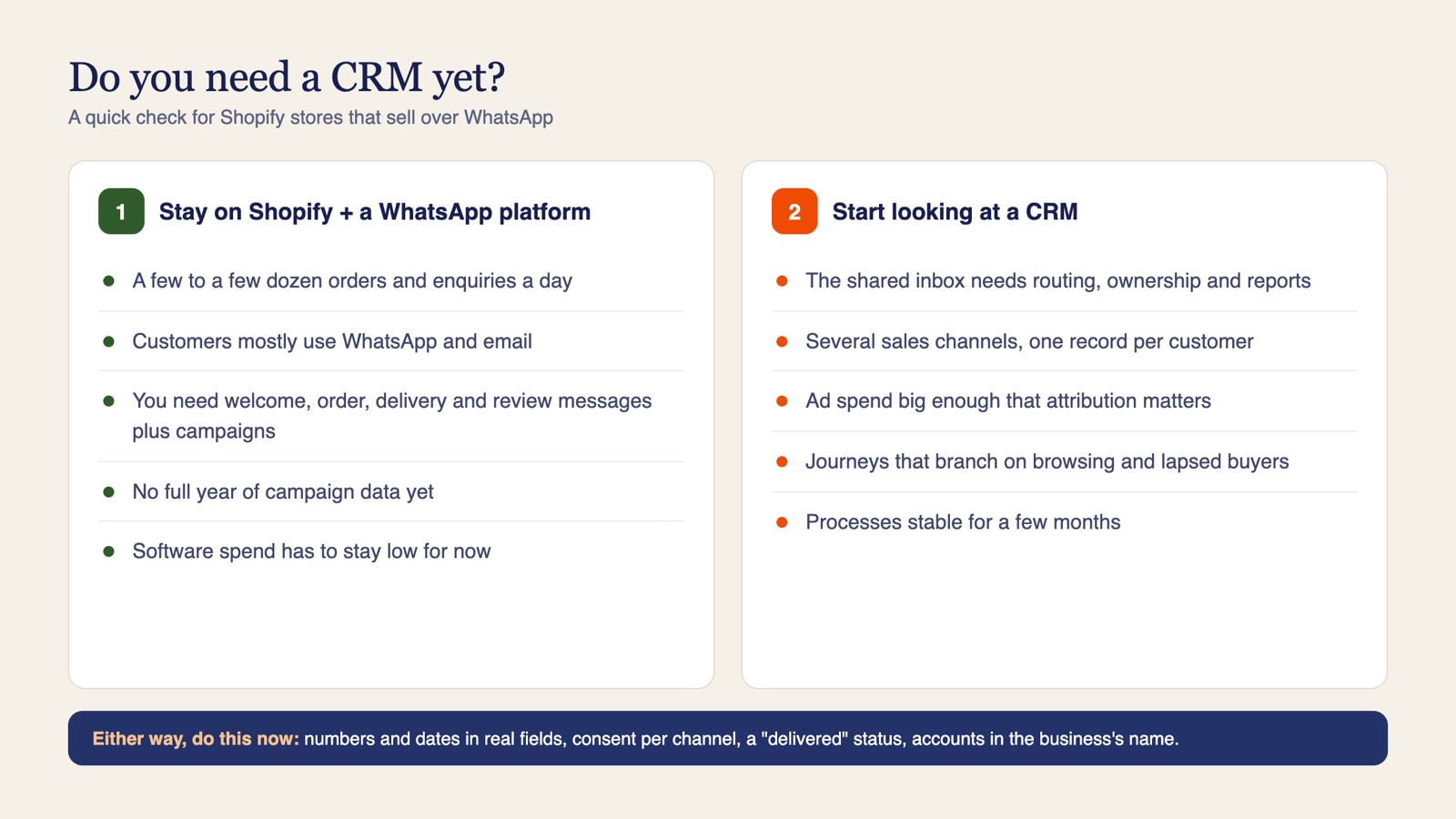
Most small stores ask this too early. Here is the check we would use on any Shopify store, based on that call and others like it.
Stay with Shopify and a WhatsApp platform if most of these are true:
- You handle a few to a few dozen orders and enquiries a day, with a small team.
- Your customers mostly reach you on WhatsApp and email.
- What you want is welcome messages, order and delivery updates, review requests and seasonal campaigns.
- You have not yet run a full year of campaigns, so you do not know which segments and messages work.
- Monthly software spend has to stay low until the new site pays back.
Start looking at a CRM when several of these become true:
- Volume has grown to the point where the shared inbox needs routing rules, ownership and reporting.
- You sell across several channels (website, marketplaces, social, calls) and need one record per customer.
- You run paid ads at a scale where cross-channel attribution changes how you spend.
- You need journeys that branch on behaviour (browsed, bought, lapsed) beyond what Shopify Flow handles comfortably.
- Your processes have stayed the same for a few months, so you know what the CRM must do.
Whichever way you go, do these now:
- Store phone numbers, WhatsApp numbers and occasion dates in proper fields, never in notes.
- Record consent per channel, and only when the customer actually ticked the box.
- Make the sign-up incentive members-only, with a unique code sent after joining.
- Add a "delivered" status, even if it is just a tap for the team.
- Keep every software and Meta account in the business's name.
For a deeper look at segmentation without a CRM and which CRMs work best for WhatsApp once you do need one, see do Shopify stores need a CRM for WhatsApp marketing.
Want us to look at your store?
If your orders live on staff phones, your sign-ups are not reaching your welcome email or a peak date is coming and nothing is ready, start with a review like the one above. We look at the live store and admin without changing anything, tell you what we found and who should fix each item, and recommend the smallest setup that gets you through the next peak. If a CRM is the right answer, we will say so, and if it is not, we will say that too.
See our e-commerce solutions and WhatsApp Business API setup, or book a call with us.
Frequently asked questions
Do I need a CRM for my Shopify store?
Usually not at first. If you handle a few to a few dozen orders and enquiries a day and mainly use WhatsApp and email, Shopify plus a WhatsApp platform covers welcome messages, order and delivery updates, review requests and seasonal campaigns. Look at a CRM once volume, channels and processes have settled.
Can Shopify send WhatsApp messages automatically?
Not on its own. You connect a WhatsApp Business API platform such as BotSpace to the store, and Shopify events like a sign-up, a paid order or a delivered status then trigger WhatsApp templates, alongside the emails Shopify already sends.
Why is my Shopify pop-up not sending the welcome email?
Check the customer record the pop-up creates. Common causes are the phone or WhatsApp number landing in the notes field, email consent not being set the way the automation expects, or the form not using Shopify customer fields at all.
How do I send a review request only after an order is delivered?
Add a delivered status, even a single tap for the team, because Fulfilled usually means the order left the shop. Trigger the review request from that status, send it once per order and skip it if a complaint is open.
Is it hard to switch from Shopify email to a CRM like Klaviyo later?
It is easier if you prepare now: keep numbers and dates in proper fields, record consent per channel, use consistent tags and keep every account in the business name. Then a later move is an import, not a clean-up project.
What does Shopify and WhatsApp automation cost to run each month?
For a small store, tens of dollars: a WhatsApp platform from about $15 a month, Meta fees of about AED 0.183 per marketing message and AED 0.058 per utility message in the UAE, and Shopify email within the free monthly allowance.